Hyprland vs HypeLand: The Architecture of Wayland Compositors
Is Hyprland a Desktop Environment or just hype? Explore the C++ Wayland compositor, Aquamarine backend, tiling physics, and how to build a sovereign stack.
ENGLISH
Hyprland vs. HypeLand: The Architectural Truth of the Wayland Compositor
Description: Is Hyprland the ultimate Wayland compositor or just endless Linux ricer hype? Uncover the deep technical reality of Hyprland, the C++ dynamic tiling compositor built on the Aquamarine backend. Learn why Hyprland is NOT a Desktop Environment, how it handles DRM/KMS framebuffers, IPC sockets, and window layout algorithms, and how to build a complete desktop stack using Waybar, Hyprlock, and xdg-desktop-portal-hyprland.
In the endless cycle of Linux desktop fetishism, modern rice-posting forums and social media algorithms have turned Hyprland into a viral phenomenon. Beginners flock to screenshots of translucent, blurred terminals floating over anime wallpapers with spring-physics animations, believing they have discovered a shiny new "operating system" or a drop-in replacement for GNOME or KDE Plasma. They are met with immediate friction: a black screen, an empty config, and a flashing terminal prompt. This reaction stems from a fundamental breakdown in architectural understanding. Hyprland is not a Desktop Environment. It does not care about your volume sliders, your Wi-Fi settings, your file manager, or your system tray. Hyprland is an uncompromising, highly specialized, dynamic tiling Wayland Compositor. It performs one task with mathematical precision: managing display surfaces, rendering layouts via hardware acceleration, and dispatching input events. To confuse a Wayland compositor with a Desktop Environment is to mistake an engine block for a fully assembled supercar.
Fun Fact 1: Hyprland was created by developer Vaxry (Vaxerski) in 2022 while at university, initially built on top of the wlroots library. However, in 2024, to break free from the strict, hyper-minimalist design restrictions of wlroots—which stubbornly resisted features like custom eye-candy rendering pipelines and hardware-accelerated blur—the Hyprland team wrote their own lightweight rendering backend library from scratch, named Aquamarine.
The Anatomy of a Compositor (Why Hyprland Is NOT a Desktop Environment)
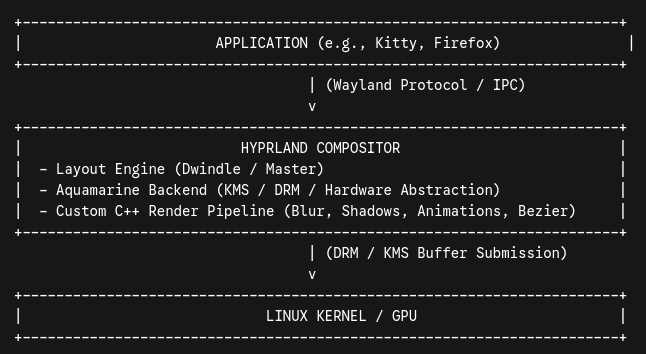
To understand why Hyprland exists—and where the lines of responsibility are drawn—one must dissect the fundamental difference between the legacy X11 architecture and the Wayland Protocol.
Under X11, the display architecture was heavily fragmented. You had an X Server (Xorg) handling display input/output, a separate Window Manager (such as i3, AwesomeWM, or Openbox) dictating window positioning, and a Compositor (like picom or compton) handling transparency, shadows, and off-screen buffer rendering.
Wayland collapsed this multi-tiered abstraction layer. Under Wayland, the Compositor IS the Display Server and the Window Manager combined. When an application renders a frame, it writes its buffer directly into shared memory (via Wayland surface protocols) or passes a Direct Rendering Manager (DRM) handle. The compositor receives these surfaces, calculates their spatial geometry based on tiling algorithms, applies transformations (such as scaling, rotation, border rendering, and animations), composites them using hardware acceleration APIs (OpenGL/Vulkan via the GPU), and hands the final frame off to the Linux kernel’s Kernel Mode Setting (KMS) driver for display on your physical monitor.
Hyprland performs this low-level orchestration with blistering speed because it is written purely in C++. It features an internal socket-based IPC system (hyprctl) that allows external scripts to query system state and dispatch real-time commands with near-zero latency.
However, because Hyprland adheres strictly to compositor responsibilities, it leaves a vast functional void that monolithic Desktop Environments (DEs) like GNOME, KDE Plasma, or System76's COSMIC handle out of the box:
No System Status Bar: Hyprland cannot draw a clock, a battery indicator, or a network tray. You must integrate a third-party Wayland bar, such as Waybar, AGS (Aylur's GTK Shell), or Eww.
No Application Launcher: Pressing Super will not pull up an app grid. You must run external IPC launchers like Wofi, Rofi-lbonn, Fuzzel, or Toofi.
No Notification Daemon: System alerts will vanish into the void unless you run a background daemon like Dunst, Mako, or SwayNC.
No Display/Session Manager: Hyprland provides no graphical login screen. It relies on TUI display managers (Ly, Greetd) or execution directly from a TTY shell via session wrappers like uwsm.
No Built-in Screen Sharing or File Choosers: Application interaction with the host OS requires implementing Desktop Portals. Screen capturing and clipboard management require xdg-desktop-portal-hyprland, PipeWire, grim, slurp, and wl-clipboard.
Calling Hyprland a "desktop" is a misnomer. Hyprland is the foundational physics engine of a desktop that you are required to construct brick by brick.
Deconstructing the "Hype": Mechanical Superiority or Bloated Eye Candy?
The central critique leveled against Hyprland by UNIX minimalists (particularly users of Sway, River, or OpenBSD) is that its emphasis on aesthetic flourishes—rounded corners, drop shadows, field-of-view blurs, and spring animations—violates the Unix Philosophy of doing one thing well. Is Hyprland merely "HypeLand"—a eye-candy trap for dotfile hoarders—or does it represent genuine architectural innovation?
The reality lies in its layout engine and configuration flexibility. Unlike legacy tiling managers that force rigid binary-space partitioning (BSP), Hyprland’s default Dwindle layout dynamically recalculates window geometry based on tree-node insertion parameters, while allowing effortless switching to a Master-Stack layout or tabbed window groups at runtime.
Furthermore, Hyprland features windowrulev2, a matching system that uses regular expressions against window title, class, initial size, and workspace attributes:
# Example Hyprland Rule: Force floating mode for Picture-in-Picture windows
windowrulev2 = float, title:^(Picture-in-Picture)$
windowrulev2 = pin, title:^(Picture-in-Picture)$
windowrulev2 = size 600 338, title:^(Picture-in-Picture)$
This level of declarative control is virtually unmatched in traditional Wayland compositors. Additionally, Hyprland exposes a native C++ plugin system (hyprpm), enabling developers to compile custom layout paradigms (such as hy3 for manual i3-style tiling or hyprexpo for macOS-style Mission Control workspace overviews) directly into the compositor binary.
Where critics hit a valid nerve is stability and power consumption. Rendering smooth bezier curves and multi-pass blurs on high-refresh-rate 4K displays demands continuous GPU state transitions, increasing power consumption on laptops compared to static compositors like Sway. Additionally, rapid development cycles and custom C++ memory layouts mean that ABI breakage can occur between minor versions, requiring users who rely on plugins or custom builds to recompile their entire ecosystem.
Fun Fact 2: To handle modern multi-monitor HiDPI setups without subpixel distortion, Hyprland built its own fractional scaling engine. While other compositors often force fractional scaling by rendering at 2x and downscaling via the GPU (causing blurriness in XWayland applications), Hyprland allows granular per-monitor scale factors, paired with global protocol flags like xwayland:force_zero_scaling = true to force high-density rasterization without performance penalties.
The Desktop Blueprint: Building a Complete Functional Ecosystem
Component Category | Recommended Tooling | Functional Purpose
Compositor Engine | hyprland | Window placement, GPU rendering, Wayland compositor logic.
Render Backend | aquamarine | Low-level KMS/DRM GPU device initialization and buffer swaps.
Status Bar / HUD | waybar or ags | Workspace indicators, hardware metrics, system tray execution.
App Launcher | rofi-lbonn-wayland or fuzzel | Dmenu-style application execution and script runners.
Notification Engine | swaync or dunst | Desktop notification popups and control center widget.
Session Lock / Idle | hyprlock & hypridle | PAM-authenticated screen lock and power management daemons.
Wallpaper Utility | hyprpaper or swaybg | Multi-monitor static/animated background rendering.
Media & Display Portal | xdg-desktop-portal-hyprland | PipeWire screencasting, WebRTC sharing, and file pickers.
Without this specific constellation of utilities bound together through configuration files in ~/.config/hypr/, the compositor remains a bare skeleton. It demands technical competence, declarative organization, and continuous maintenance.
Fun Fact 3: The MitsuoLabs Reciprocity and Stewardship License (MRSL-1.0) and Master Professional and EULA (MMPEULA-1.0) explicitly champion the modular software philosophy embodied by standalone Wayland compositors. We reject monolithic "black-box" operating software that traps user data inside unmodifiable system shells. By ensuring that every layer of software remains independent, repairable, and free of telemetry, developer-driven platforms like Hyprland align directly with MitsuoLabs’ vision of absolute digital liberty.
Conclusion: The Triumph of Explicit Ownership
Hyprland is not a gimmick, nor is it a complete desktop out of the box. It is a masterclass in modern Linux engineering—a high-performance, dynamic Wayland compositor that trades the cozy hand-holding of traditional Desktop Environments for total, granular sovereignty over your display stack. It demands that the user cease being a passive consumer of a pre-packaged GUI and become an active architect of their own computing environment. When stripped of the social media hype, Hyprland stands as a triumph of modular UNIX-style minimalism supercharged with modern C++ performance. If you are willing to learn its architecture and curate your own environment, it delivers an unparalleled computing experience. If you want something that "just works" out of the box, stay on GNOME or Plasma—and leave the compositor to the mechanics.
Remember: A computer that configures itself for you is not a tool of empowerment; it is an environment designed to limit your understanding. Real control over your hardware begins the moment you write the first line of your own display configuration.
Technical Bibliography:
Vaxry (Vaxerski). (2024). Hyprland is now fully independent! Hyprland Official News. https://hypr.land/news/independentHyprland/.
Hyprland Development Team. (2022–2026). Hyprland: Dynamic tiling Wayland compositor that doesn't sacrifice on its looks. GitHub Repository. https://github.com/hyprwm/Hyprland.
Hyprland Wiki. (2026). Aquamarine: A lightweight Linux rendering backend library. Hyprland Official Documentation. https://wiki.hypr.land/Hypr-Ecosystem/aquamarine/.
ArchWiki Contributors. (2026). Hyprland. Arch Linux Official Wiki. https://wiki.archlinux.org/title/Hyprland.
Wayland Protocol Specification. (2026). The Wayland Protocol Architecture & Compositor Responsibilities. Wayland/freedesktop.org Documentation. https://wayland.freedesktop.org/docs/html/.
Heinemeier Hansson, David (DHH). (2025–2026). Omarchy: An opinionated Arch Linux distribution pre-configured for modern developer workflows. GitHub Repository. https://github.com/basecamp/omarchy.
Writer: MitsuoLabs CopyWriting Team | Date: [21/07/2026] | License: MRSL-1.0 (mitsuolabs.com/LegalFramework/mrsl-1.0.html) The text (& banner-like image) are itself licensed under MRSL‑1.0 {©-(c)-2026} (Brazil as Jurisdiction and Stewardship as option). MitsuoLabs™ (orcid: 0009-0006-6909-0990 {https://orcid.org/0009-0006-6909-0990}) are the stewards and licensors of this text. Contact for inquiries matters: contact@mitsuolabs.com.